FunscriptForge — Make Every Script Worth Playing
FunscriptForge is a post-processing tool for funscripts. It takes an existing .funscript file — whether hand-scripted, community-downloaded, or auto-generated — and makes it feel better on your device.
It does not generate funscripts from video. It improves the ones you already have.
What is a funscript?
A .funscript file is a timed list of position commands for a haptic device. Each command says: at this moment, move to this position. The device follows that list in sync with video or audio content.
Quality matters. A good script feels natural and engaging — you forget the device is there. A poor script feels mechanical, monotonous, or jarring. FunscriptForge closes that gap.
Where FunscriptForge fits
flowchart LR
    A["Source content\nvideo / audio"] --> B["Generate funscript\nhand-scripted or auto"]
    B --> C["FunscriptForge\nAnalyze - Edit - Export"]
    C --> D["Mechanical device\nHandy / OSR2 / SR6"]
    C --> E["Estim device\n2b / Tingler / FOC-Stim"]
FunscriptForge sits between script creation and playback. You bring in a raw funscript; it comes out improved, device-safe, and ready to play.
Why a raw script isn't enough
Most raw funscripts — even well-made ones — share the same problems:
- Uniform tempo — same intensity throughout, no dynamics
- No quiet moments — everything at full speed, no breathing room
- Jarring transitions — sections smash into each other with velocity spikes
- Off-center strokes — motion stuck in the top or bottom half of the range
- Device-unsafe speeds — commands faster than the hardware can execute
These aren't scripting mistakes. They're things that only become visible when you analyze the motion structure — which is exactly what FunscriptForge does.
What FunscriptForge adds
- Structure-aware analysis that finds natural phrases in the motion, detects behavioral problems, and measures tempo across the entire script
- 25 transforms that add dynamics, smooth transitions, fix centering, and shape intensity — each with live before/after preview
- Device awareness that caps velocity for your hardware, adds natural timing variation (groove), and protects against unsafe commands
- Tone system — pick one of six moods (Tender through Dominant) and the tool shapes your entire script to match
- Multi-axis generation — turn a single-axis stroke script into a full 6-axis experience for OSR2 and SR6
- Estim audio rendering — generate ready-to-play stereo WAV files for audio estim devices, no restim setup required
- Clean export with device-specific folders, channel files, heatmaps, and a forge log that records every change
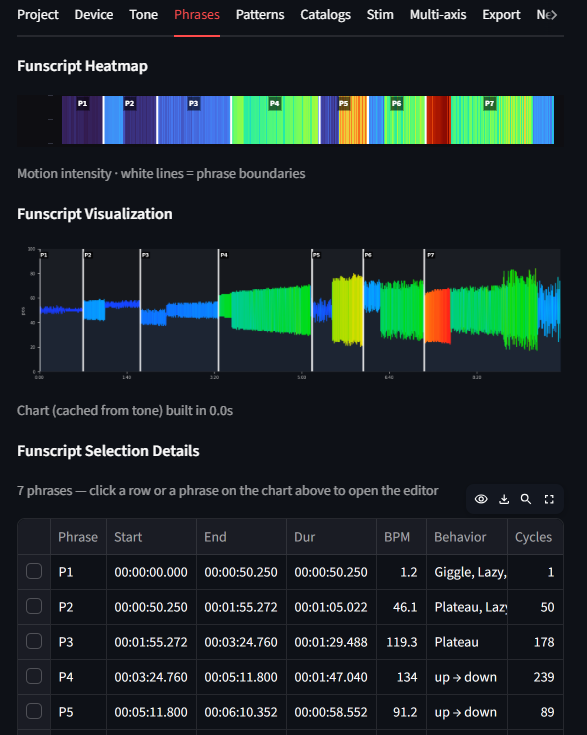 Every phrase visible. Every behavior labeled. Every tempo change marked.
Who uses FunscriptForge
Script creators
You hand-script or auto-generate funscripts and want them to feel polished before sharing. FunscriptForge finds the structural problems you can't see by eye — tiny strokes, off-center motion, monotone sections — and gives you one-click fixes for each.
Key use case: Load your finished script, run the assessment, fix the flagged phrases, export a device-safe version. 10 minutes instead of an hour of manual tweaking.
Script consumers
You download community scripts and want them tuned for your device. Different devices have different speed limits and stroke ranges. A script made for OSR2 might overdrive a Handy; a script made for Handy might feel sluggish on SR6.
Key use case: Load someone else's script, pick your device on the Device tab, choose a Tone, export. The script is now optimized for your hardware.
Estim users
You use electrostim devices (2b, 312, Tingler, EstimHero, ZC95, FOC-Stim, NeoStim) and want funscript-synced stimulation. FunscriptForge generates all the channel files and renders stereo audio — so you can play estim in sync with video without setting up restim.
Key use case: Load a funscript, select your estim device, pick a stim character (Gentle through Unpredictable), export. You get ready-to-play WAV files and the full set of channel funscripts.
Multi-axis device owners
You have an OSR2 or SR6 and want more than just stroke. FunscriptForge generates roll, pitch, twist, surge, and sway from your primary stroke data — each phrase gets its own physical position style.
Key use case: Load a single-axis script, assign position styles per phrase on the Multi-axis tab, export. Your T-Code player auto-discovers the new axis files.
What you'll learn in this guide
This guide walks you through the full FunscriptForge workflow:
- Install — download and launch the app
- Your First Funscript — load a script, run the assessment, apply a tone, and export
- Concepts — the vocabulary FunscriptForge uses (phrases, behavioral tags, transforms, tones)
Then the per-tab guides go deeper:
- Phrase Editor — edit one phrase at a time with transforms and live preview
- Pattern Editor — batch-fix all phrases of a given type
- Transforms — what every transform does, with before/after charts
- Multi-axis — generate secondary axes for OSR2 and SR6
- Export — device folders, estim channels, audio WAV, heatmaps
For most users, steps 1-3 are all you need. Load, tone, export, play.
What FunscriptForge does NOT do
- It does not generate a funscript from a video — you need an existing
.funscriptfile - It does not drive your device — use MultiFunPlayer, Intiface, or your device's native app
- It does not require an internet connection — everything runs locally on your machine
Next: Install FunscriptForge
FunscriptForge is made by Liquid Releasing. Audio synthesis uses math extracted from restim by diglet48 (MIT license). Estim channels powered by funscript-tools by Lucifie.